
Remote port forwarding on macOS
Expose a service reachable from your Mac through a controlled listener on an SSH server.
Understand the two ends
A Remote Forward listens on the SSH server. When a client connects to that server-side port, traffic travels through SSH to a target reachable from your Mac.
For example, a web application on your Mac at 127.0.0.1:3000 can be reached from the SSH server at 127.0.0.1:18080. This loopback-only example does not make the service public.
Configure a remote forward
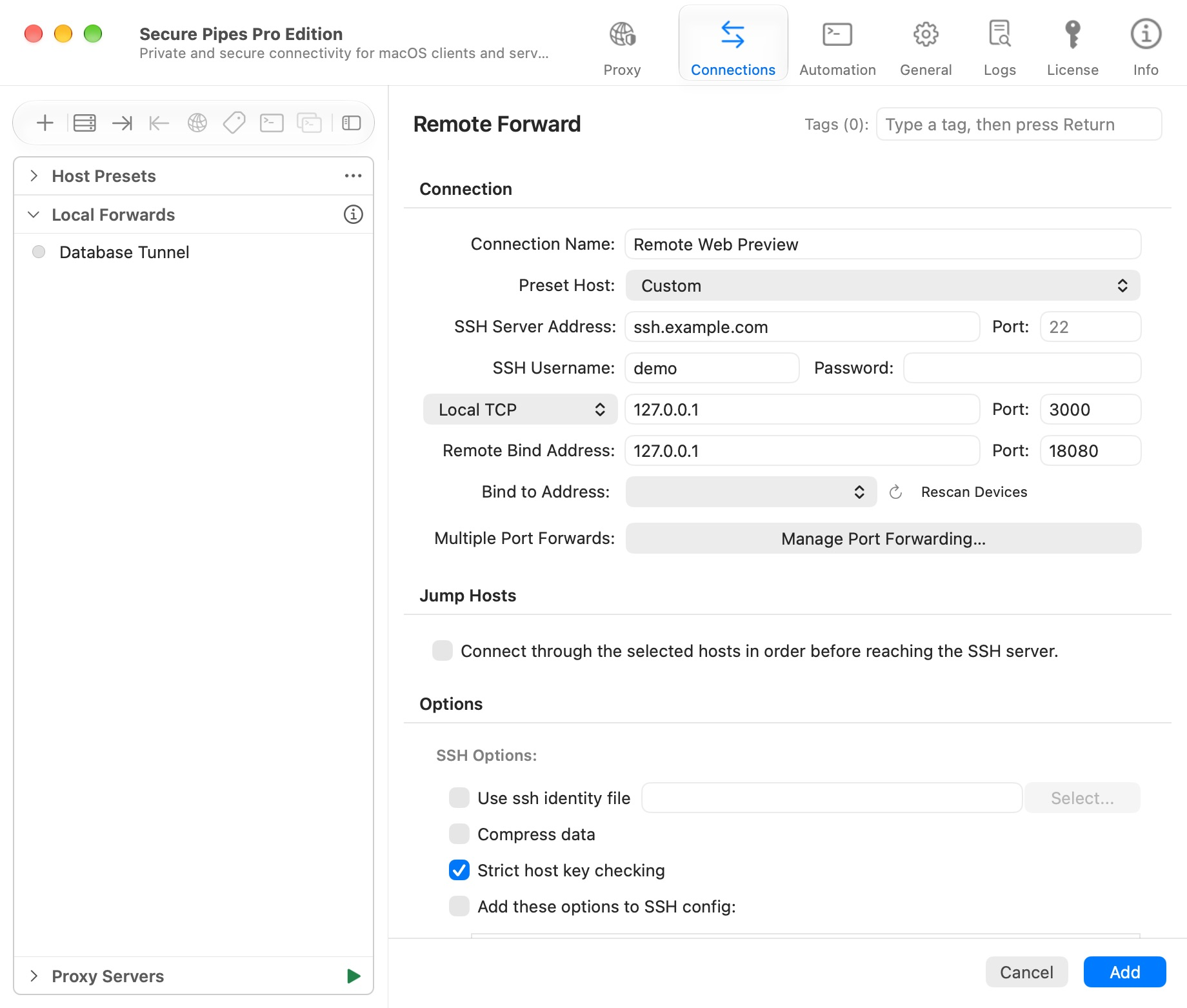
- Choose Connections → + → New Remote Forward….
- Name the profile and configure its SSH server and authentication.
- Set the local TCP endpoint to
127.0.0.1, port3000. - Set the remote bind address to
127.0.0.1, port18080. - Save and connect. On the SSH server, test the forwarded service through
http://127.0.0.1:18080.
The local service must actually be running. Keep server trust checks enabled. Your SSH account must be allowed to request remote listeners.
Manage multiple remote listeners
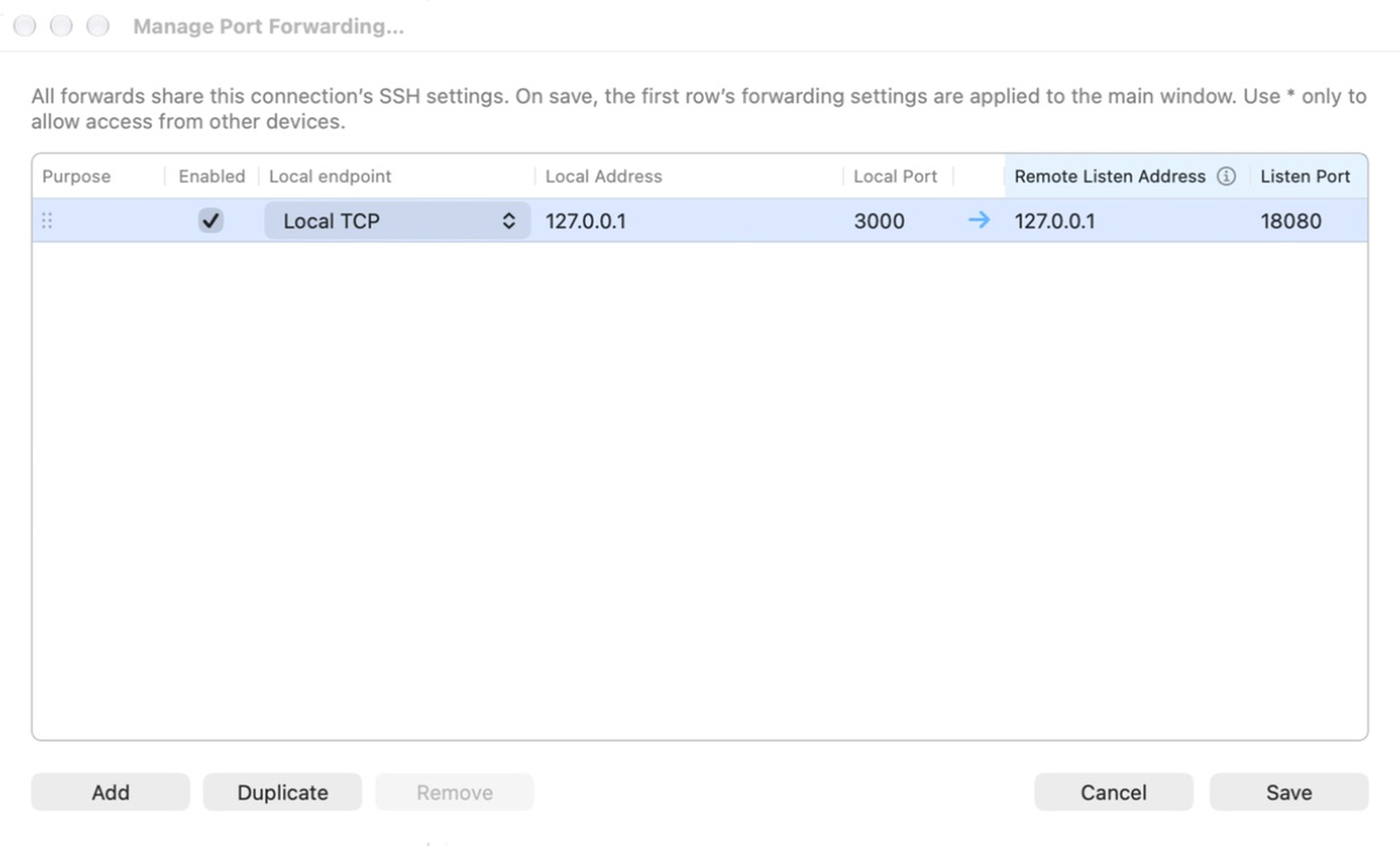
Choose Manage Port Forwarding…. The column order follows the remote-forward editor: purpose, enabled state, local endpoint/address/port, then remote listen address/port.
The same profile supports up to 128 mappings. Add, duplicate with ⌘D, disable, remove or drag rows to reorder them. Save the mapping table, then save the profile. All enabled rows use that profile's SSH session and stop together. Multi-port forwarding requires Pro after the shared seven-day trial.
A Local Unix Socket target replaces the local host/port with an absolute socket path on your Mac. It does not make the remote listener a Unix socket.
Allow access beyond server loopback
Requesting
0.0.0.0does not override SSH server policy. The server controls which addresses a remote listener may bind to.
To honor an explicit remote bind address, an OpenSSH server commonly needs GatewayPorts clientspecified, plus forwarding permission and the appropriate firewall rules. Ask the server administrator to review GatewayPorts, AllowTcpForwarding and any PermitListen restrictions.
Use server loopback unless remote clients explicitly need access. A public listener can expose the service on your Mac to anyone permitted by the server's firewall. Authenticate the service itself and restrict the listener where possible.
Diagnose failures
- Listener refused: verify account permissions and server forwarding policy.
- Port already in use: choose another server-side port; inspect the row number in the error.
- Listener remains localhost: check the server's
GatewayPortsbehavior. - Tunnel connects but the page fails: verify the local application is listening at the selected address/port, and check its own authentication or host restrictions.
- Changes seem ignored: save both editors and reconnect the profile.
This feature forwards TCP streams. It is not UDP port forwarding or a general VPN.
Based on Secure Pipes 2.0.14 · Updated October 18, 2026