
DNS settings and cache
Control name resolution alongside proxy routing, while keeping local names and existing network services reachable.
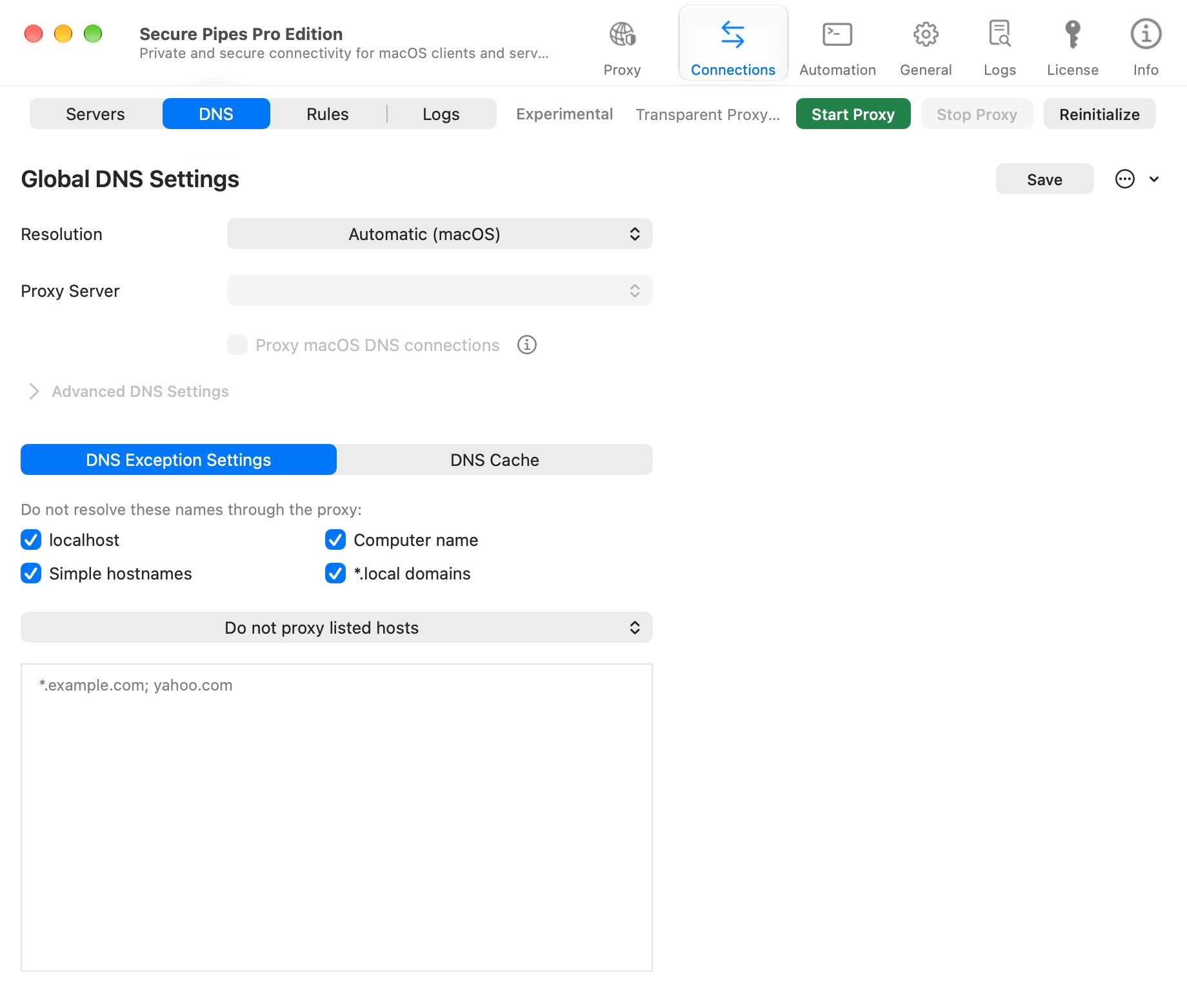
Open global DNS settings
Open Proxy → DNS. Start with Automatic (macOS) unless you have a reason to choose another resolution path. Select the desired configuration and click Save.
DNS lookup and application traffic are related but distinct. A webpage may fail before a TCP connection is established because its name could not be resolved. Conversely, successful DNS does not prove that the target port is reachable.
Choose a resolution mode
| Resolution | When to choose it |
|---|---|
| Automatic (macOS) | Use the system resolver for the default resolution path. Start here when you do not need a separate proxy-based resolver. |
| Through proxy server | Select a proxy and configure upstream DNS servers for queries using this path. The proxy must be able to reach those DNS servers. |
| Do not resolve | Disable this resolution path. This is not a general privacy switch: name-dependent connections can fail when they have no other supported way to resolve their destination. |
With Through proxy server, choose Proxy Server and expand Advanced DNS Settings to review Upstream DNS. Enter server addresses separated by commas, for example 1.1.1.1, 8.8.8.8. These queries use TCP port 53 through the selected proxy, and the addresses are tried from left to right. This field is not a DoH URL or a configurable DNS port.
Click Save to apply your changes. Actions → Reset loads defaults into the editor; it still requires Save to apply them. Record your working settings before resetting.
Preserve local-name exceptions
The DNS Exception Settings area provides exceptions for localhost, the computer name, simple hostnames and .local domains. These help preserve local services and discovery.
Review the exception mode and host list together. A list used for exclusions has the opposite effect from a list intended to select names for proxying. Do not remove local exceptions just to force an unrelated public website through a proxy.
- Do not proxy listed hosts: exclude matching names from proxy-based resolution.
- Proxy only listed hosts: select matching names for proxy-based resolution.
Separate patterns with newlines, commas or semicolons, for example *.example.com; example.org. Review the local-name checkboxes separately from this list.
Proxy macOS DNS connections
The optional Proxy macOS DNS connections setting lets macOS DNS connections on ports 53, 443 and 853 follow transparent-routing rules. They use a proxy only if a rule or default route selects one. It does not mean that every HTTPS connection is DNS, nor does it guarantee all applications use the same resolver.
Usually leave this setting off unless your setup needs it. Applications with their own encrypted DNS or connection reuse may behave differently from a fresh system lookup.
Rule-specific DNS and cache
A routing rule can use its current proxy or global DNS settings. Its Use DNS Cache option can skip cached answers and prevent new answers from being stored for that rule.
The DNS Cache tab helps inspect cached information. When diagnosing a failure, note the name, rule, selected resolution path and whether the answer came from cache. Changing DNS policy does not necessarily replace already established application connections.
Search for a domain and use Refresh to update the listing. The columns distinguish DNS TTL from Cache TTL, and show when an answer was cached and when it expires. Clear DNS Cache asks for confirmation; use it when you deliberately need to discard cached proxy answers. It is not a command to clear every application's or macOS's DNS cache.
An empty table can be normal: this view contains valid DNS answers resolved through Transparent Proxy, rather than a history of every name lookup on the Mac.
LAN clients
LAN proxy sharing is not a general LAN DNS server. For SOCKS clients, proxy-side DNS preserves destination names. A phone's manual HTTP proxy affects requests that honor that setting; it does not force all DNS packets through the Mac.
See LAN sharing and troubleshooting before changing device-wide network settings.
Based on Secure Pipes 2.0.14 · Updated October 18, 2026